Ask Dynamics 365 a question.
Get the answer in seconds.
RyvSoft AI sits next to the F&O form your people already use. They ask in plain words, it answers from live data and prepares the change. Nothing is saved until they click Confirm.
In your own sandbox, with your own data. Free and without obligation.
- Cloud and on-premises
- Same F&O security
- Your choice of AI model
- No Copilot licences needed
The same question, two ways
"Which customers are more than 60 days overdue, and are any of them already on hold?" A credit controller asks this every week.
Today
- Open the customer aging report and set the aging periods
- Filter by company and run it
- Export to Excel, sort and total by customer
- Open each customer to see whether it is already on hold
- Change the hold on every record by hand
With RyvSoft AI
- Which customers are more than 60 days overdue? Show the top 5.
- The table, the total and the hold status, read from live F&O data. Every step is shown.
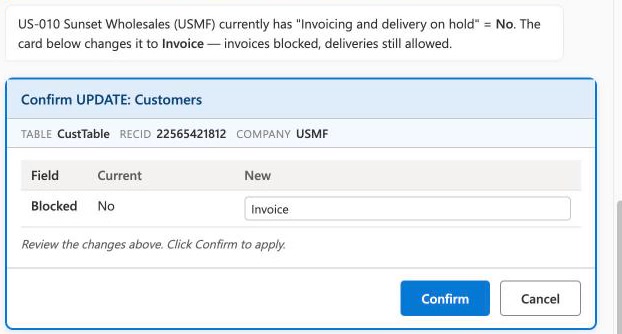
- "Put US-010 on invoice hold." A card shows the change; you click Confirm or Cancel.
Measured on 30 October 2026 on a Contoso demo environment: 10.7 s to the answer, 10.5 s to the prepared change. Your times depend on the AI model and the amount of data.
Less clicking. Faster answers. No risk to your data.
Anyone can ask about balances, orders, stock or invoices in plain words. No waiting for IT, no exports to Excel to answer a simple question.
Put a customer on hold, fill in missing master data, correct a batch of records. It prepares the change, a person confirms it.
A standard F&O package. Same forms, same roles, cloud or on-premises. No Copilot licences, no Copilot Studio, no Power Platform capacity.
This is what your users will see
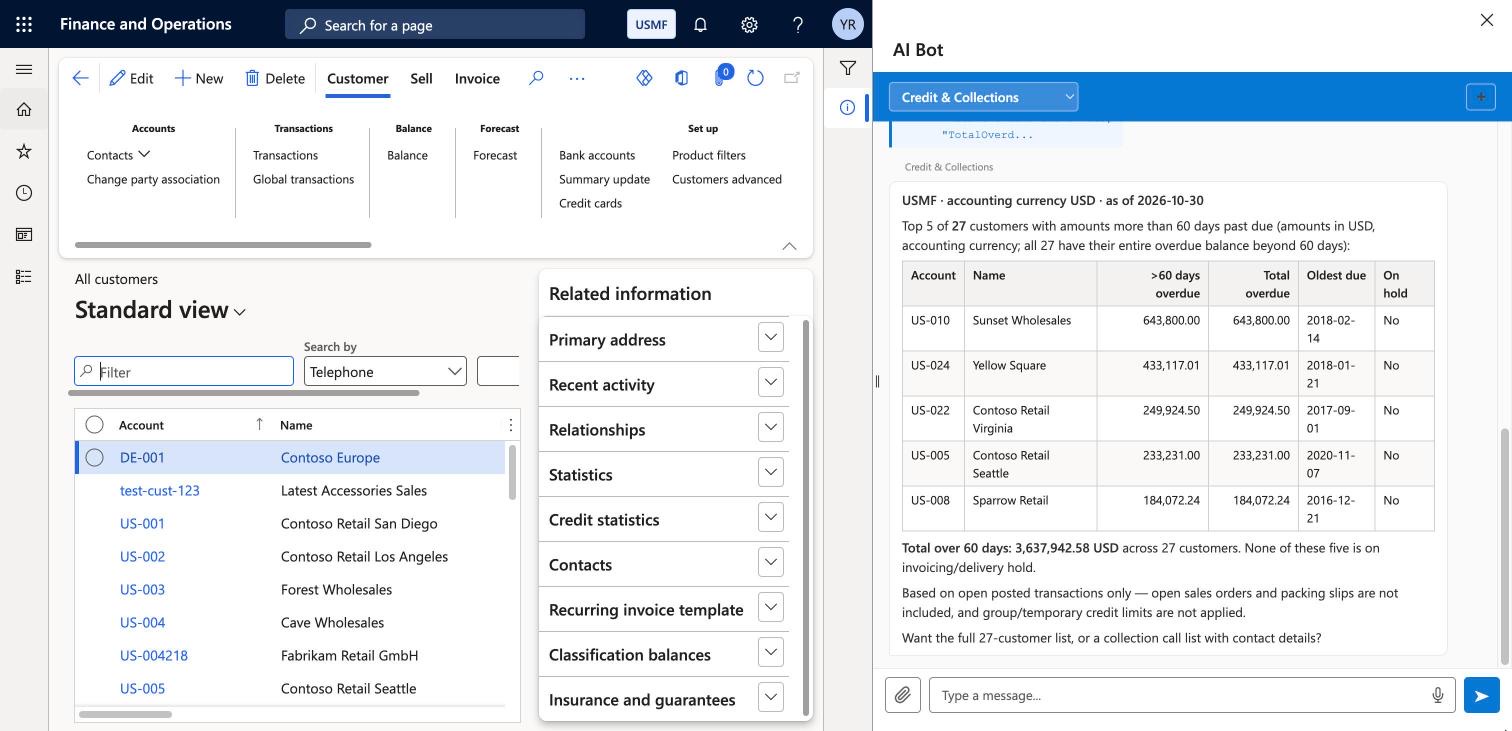
Dynamics 365 F&O with RyvSoft AI installed. Contoso demo data.
 1
2
3
4
The usual F&O formHere the All customers list. Nothing new to learn.
The AI Bot panelOpens next to any form, like the standard F&O side panels.
A ready-made agentCredit & Collections here. Pick the one for the job.
The answer from live dataThe top 5 and the total for all 27 overdue customers.
Watch three everyday tasks from start to finish
Real sessions in a Contoso demo environment: a question with an Excel file, a change that waits for the user's confirmation, and a large export that runs in the background.
A sales order, confirmed, shipped and invoiced from one sentence
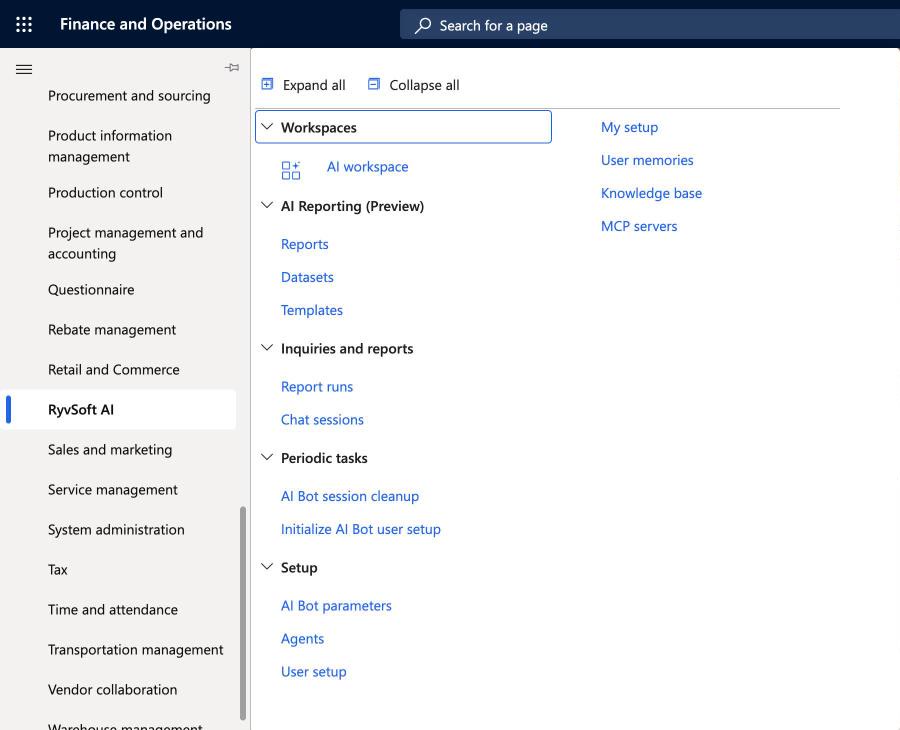
The administrator sets up the agent once: its instructions and the tools it may use. Then a user asks in plain words, confirms each write, and the order is posted with standard F&O logic in about two minutes. Agents can work across almost all of Dynamics 365 F&O, through the same data, actions and posting your users have.
Your data stays under your control
Most AI tools for ERP work from the outside and copy data out. RyvSoft AI runs on your F&O server, so it follows the rules F&O already enforces.
Runs inside your F&O
On the F&O application server, in the cloud or in your own data centre. No separate portal, no data warehouse, no copies of your data.
The user's own permissions
It works as the person who asked: their roles, their companies. Admins also choose which agents, tools and tables each user may use.
Confirm before any change
Every change is shown first and saved only after the user's click. The rule is enforced inside F&O, not by the AI model. If the record changed meanwhile, nothing is saved.
What the AI model sees
Only the question and the data read to answer it, sent to the provider you chose with your own key. With a model server in your own network, nothing leaves the building.
Chat history in your database
Each conversation is saved in F&O and is visible only to the user who had it. A periodic job deletes old conversations after the number of days you set.
Keys stored encrypted
The AI provider key is kept encrypted in the F&O parameters. RyvSoft has no access to your environment or data unless you grant it for support.
Start with jobs your teams do every day
An agent is a set of instructions plus the tools it may use. Seven are included for finance and operations, plus Agent Architect, which helps your admins build your own. All are installed through Data management.
Credit & Collections
Overdue balances, credit limit breaches and who to call first. Puts customers on hold with Confirm.
AP Invoice Check
Checks a vendor invoice, a PDF or one pending in F&O, against the purchase order and receipts.
Master Data Quality
Finds incomplete or inconsistent customer and vendor data and fixes it in bulk.
Sales Order Desk
Order status, ship dates, late and held orders, and a short reply for the customer.
Inventory
On-hand and available stock by site and warehouse, shortages and slow movers.
Period Close Assistant
A month-end checklist with counts and amounts. Posting and closing stay with people.
F&O Helpdesk
Answers "how do I" questions from your own guides and opens the right form.
A dashboard you describe instead of design
Keep a page for each desk: sales, collections, purchasing. To add a block, describe it in one sentence. An AI agent builds the query, you check it and save. From then on the block reads live F&O data without calling the AI model. Ask the AI Bot about anything you see.
See it on your own data before you decide
The quickest way to know whether it is worth it: install it in a sandbox and ask the questions your teams ask every day.
Write to us
You get the package, the installation guide and a short evaluation agreement.
Install in a sandbox
A standard F&O package, deployed like any other extension. The agents are imported through Data management.
Try your own scenarios
Connect your AI model key and ask about your own customers, vendors, orders and stock.
- What you need:
- A sandbox or test environment
- F&O 10.0.45 or later, cloud or on-premises
- An administrator to deploy the package
- A key for Claude, OpenAI or Azure OpenAI
AI model usage is billed by your provider directly. Pricing and partner terms on request.
Common questions
What is RyvSoft AI?
An AI assistant built into Microsoft Dynamics 365 Finance and Operations as a native X++ extension. Users ask questions and give tasks in plain language in a side panel; it reads live F&O data, explains it, produces files and prepares changes that the user confirms.
Does it work with F&O on-premises?
Yes. It runs on the F&O application server (AOS), so it works in the cloud and on-premises, version 10.0.45 and later.
Which AI models can I use?
You choose the provider and use your own key: Anthropic Claude and OpenAI are tested end to end, Azure OpenAI is in validation, and a compatible model server in your own network can be connected. Model usage is billed by the provider directly.
What data does the AI model see?
Only the user's question and the data the assistant reads to answer it, with that user's permissions. It goes to the provider you configured, with your key. With a model server in your own network, no data leaves it.
Can it change data on its own?
No. Changes are shown as a preview first and saved only after the user clicks Confirm. If the record changed since the preview, nothing is saved. Long background jobs run from a plan the user approves before launch.
Can users see data they are not allowed to see?
No. Every step runs with the signed-in user's F&O roles and company access. Admins can also limit which tools, agents and tables each user may use.
How is it installed?
As a standard F&O package, like any other extension. Agents are imported through Data management.
Ask your own F&O the questions your team asks every day
Start a free 30-day evaluation in your sandbox, or write to us with any question about RyvSoft AI or a partnership.